Jorge O. Castro
on 5 January 2016
Vagrant is a popular devops tool because it allows developers to easily manage virtual machines on their laptop. While this sounds easy, Vagrant allows people to finally develop on their machines using the same libraries as the operating system that’s in their server room. And since it uses virtual machines, everything is nice and compartmentalized. You can use your favorite text editor and developer tools on your laptop, save and commit, and have it magically just show up in your little Vagrant scratch space in the virtual machines. New developers don’t need to spend days customizing their environment, they just snag the developer Vagrantbox for what they were working on and get to work, and it doesn’t matter if you prefer Mac, Windows, or Linux, it all just worked.
Soon the demand for having official Vagrant images was clear, and when HashiCorp launched what would eventually become Atlas it was obvious to us that we should take a more proactive approach to maintaining an awesome Vagrant experience for our users.
Today we’re proud to announce that the Ubuntu Vagrant images have passed the 10 million download mark. If you look at the download statistics, out of the top 10 Vagrant boxes in use, 8 out of 10 of them are Ubuntu or based on Ubuntu.
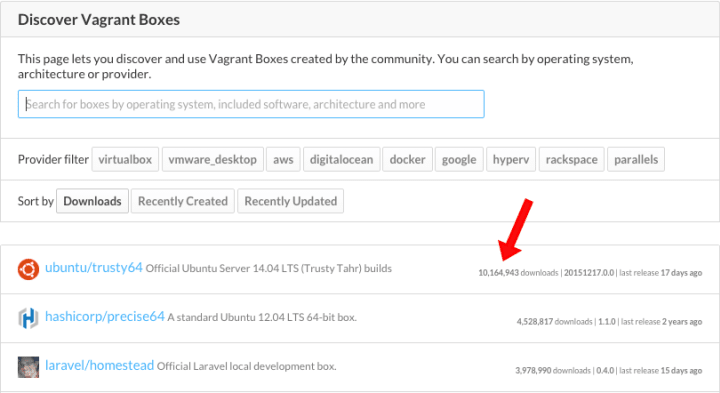
For us, this shows that developers who use Vagrant overwhelmingly prefer to use Ubuntu, and we think that’s worth celebrating! Since Ubuntu is the world’s most popular operating system for public clouds and running 65% of large scale production OpenStack private clouds, it’s not surprising to us that sophisticated devops users love the Vagrant/Ubuntu combination.
You can find all of our boxes here: atlas.hashicorp.com/ubuntu and don’t forget to try out our newest box, the Juju developer box, which provides you with a full service-oriented modelling environment for those of you who want to take your Vagrant experience to the next level.
If you have Vagrant installed you can also fire up a box via:
vagrant init ubuntu/trusty64; vagrant up --provider virtualbox
Using Vagrant and Ubuntu together? Let @ubuntucloud know how it’s working for you!